Early coverage of Gentoo 2008.0

Here’s links to a few places that posted announcements for 2008.0. Go there and get involved by voting and commenting!

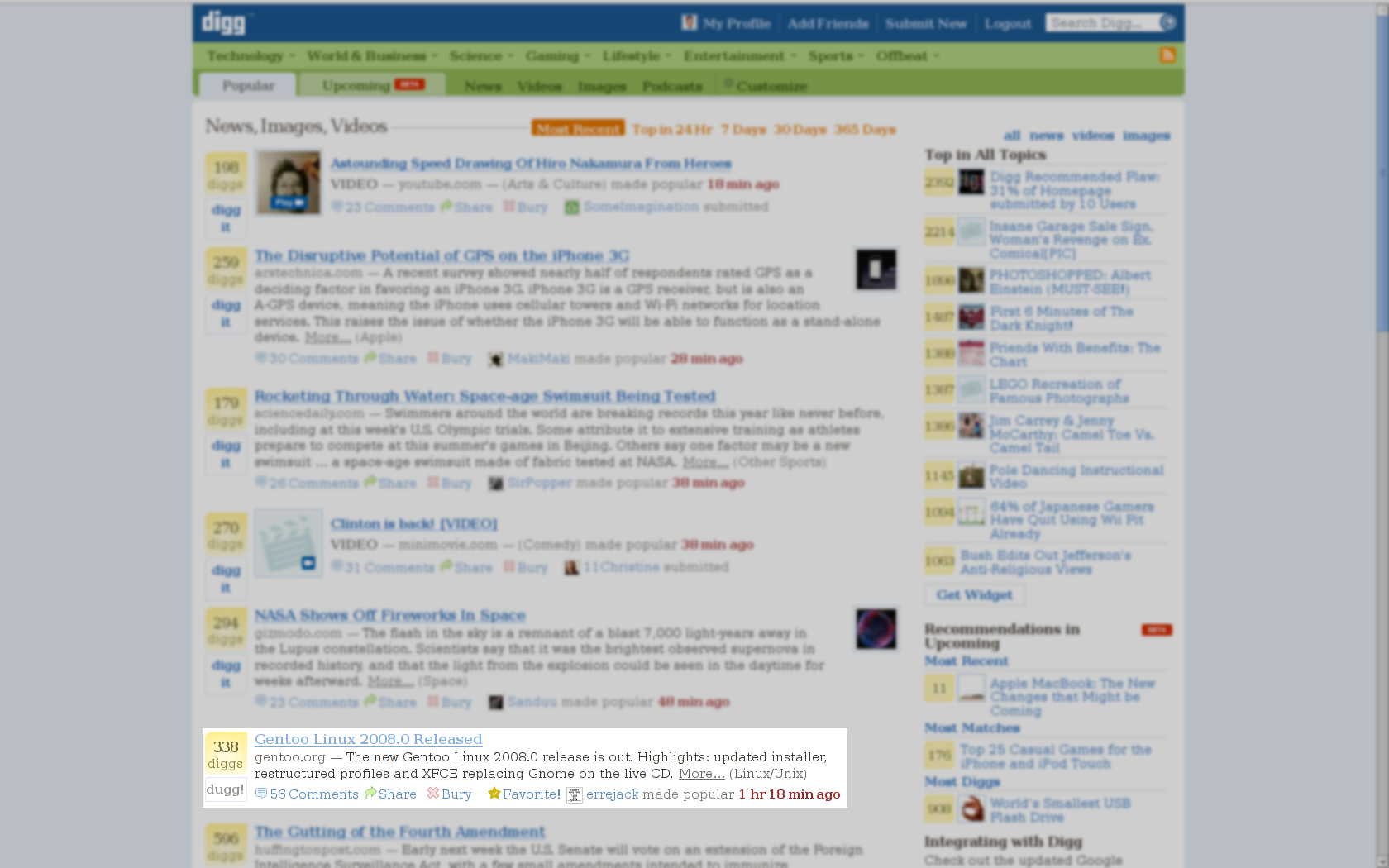
Gentoo 2008.0 makes the Digg frontpage

There’s also a ton of talk about Gentoo 2008.0 happening on Twitter, which I’m following through the Summize search engine with a search for gentoo. I’m also following blogs talking about Gentoo, and I have a news search for Gentoo that I expect to pick up more later once more journalists pick up the news.

Update 1: Added Phoronix, thanks to Denis Dupeyron (Calchan).

Update 2: Added OSNews

Update 3: Added OStatic, Heise, Linux Format, Clubic, FOSSWire, DesktopLinux.com, Linux Magazine (UK)

Update 4: Added InternetNews.com

Update 5: Added Open Source Pixels, Techgage

Update 6: Added LinuxNews.pl, Programas Livres

Update 7: Added Linux Journal, Linux1.no, PettiNix, Linux.org.ru

Update 8: Added ZDNet.co.uk, DistroWatch Weekly

Developers give existing Gentoo council a mandate

I said this briefly on the gentoo-dev list, and I want to expand on it here. The council is Gentoo’s leadership, and it’s composed of 7 people elected by all Gentoo developers using a Condorcet-style ranking vote. Of the 7 people on the old council, 5 of them decided to run again and every single council member who ran was re-elected.

This is significant because the re-election was forced over miscommunication about a meeting, and this created some serious conflicts with a sentence in the Gentoo Linux Enhancement Proposal that created the current structure, including the council. I consider this a mandate, showing that Gentoo developers have confidence in the existing leadership doing what’s best for Gentoo.

This was your chance to say yes or no, and you gave us a resounding yes. Since it isn’t often we hear much from the vast majority of developers, this really means a lot to me in saying which directions we should go, based on who you voted for (graphs here). My interpretation is that you like what’s going on now and where we’re talking about going. I’d really love to hear more input from those of you who don’t normally speak up, though. What can we do for you?

P.S. The 2008.0 release is out.

Vote for the Gentoo council!

Devs, listen up–voting closes for the Gentoo council at 23:59 UTC today (Friday). Here I’m going to tell you my surprise underdog picks. By underdog, I mean people who I didn’t realize I was going to rank fairly highly for before doing research. I dig through all my mailing-list archives of -dev, -project and -core, looking at all the recent posts by each candidate. Then I decided whether they expressed enough opinion on global directions, whether they were active enough on-list, and whether I agreed with their ideas about where Gentoo should go. Based on that, here’s my underdogs:

  • jer (HPPA arch team)
  • leio (wxWidgets, GNOME maintainer)
  • ulm (emacs maintainer)
  • dev-zero (cpp, postgresql, samba, python maintainer)

Other than them, I strongly endorse our QA lead, Halcy0n (also on GCC porting, toolchain, and C++ teams). I’m not listing anyone who’s been on the council before, because that isn’t as interesting. There are other candidates who I think have the technical qualifications–I’m not voting for some of them because I think having a strong community that follows and enforces its own Code of Conduct is not just important but vital for Gentoo to move down the path of greatness.

X.Org 7.4 prereleases ready to test in Gentoo

Last night, Dave Airlie released libdrm 2.3.1, which set the stage for all the pieces of the X.Org 7.4 prereleases to actually work (with a couple mesa patches). If you’d like to test 7.4, here’s how. This assumes you’re already running an ~arch (testing) system–if you aren’t, you might want to hold off on testing hard-masked packages. This may not work with binary drivers–particularly ati-drivers. It looks like nvidia-drivers has preliminary support for xorg-server 1.5.

echo "
# xorg-server-1.5 prerelease
=x11-base/xorg-server-1.4.99*
=media-libs/mesa-7.1*
x11-proto/dri2proto
=x11-libs/libdrm-2.3.1*
" >> /etc/portage/package.unmask
emerge -va xorg-server
emerge -va1 $(qlist -I x11-drivers)

I’ve still got 16 more packages to bump before everything’s up to date, but the main parts are in place.

Code as artwork

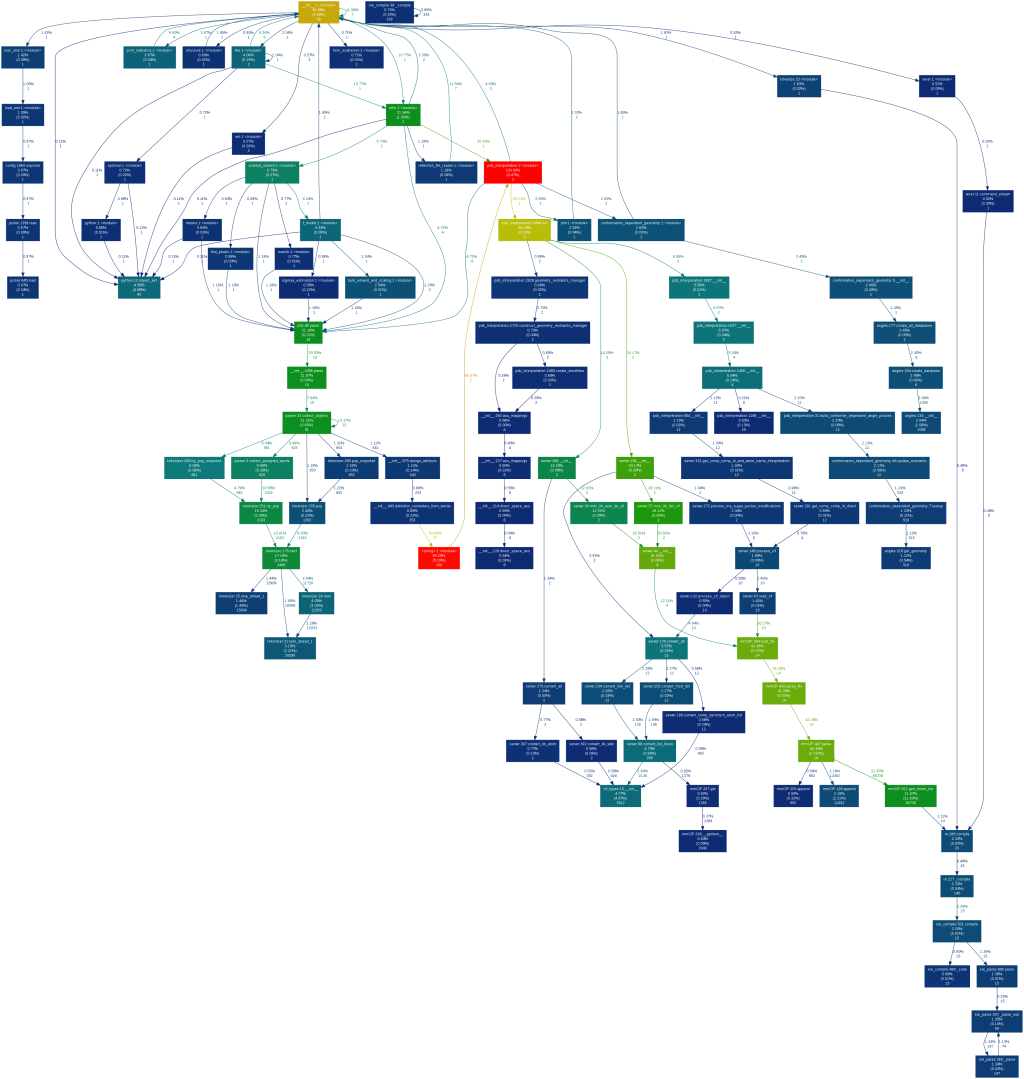
Many people think of code as artwork in some way or another and consider good code something of elegance and beauty. While working today, I came across another example of that in a visual representation of a project I’m working on.

This image shows the call graph of the file I’m editing, which is one component of a much larger project. I made it with Python’s hotshot profiler and José Fonseca’s Gprof2dot. Brighter colors mean more time is spent in those functions or their children, although it’s hard to see at this size. Or does it show some sort of futuristic gun? Your call.

The above callgraph shows every single function, but here’s a profile generated with the same tools that shows only functions that use a certain percentage of time. You can actually see the colors:

The tool you wished exists actually does: iotop

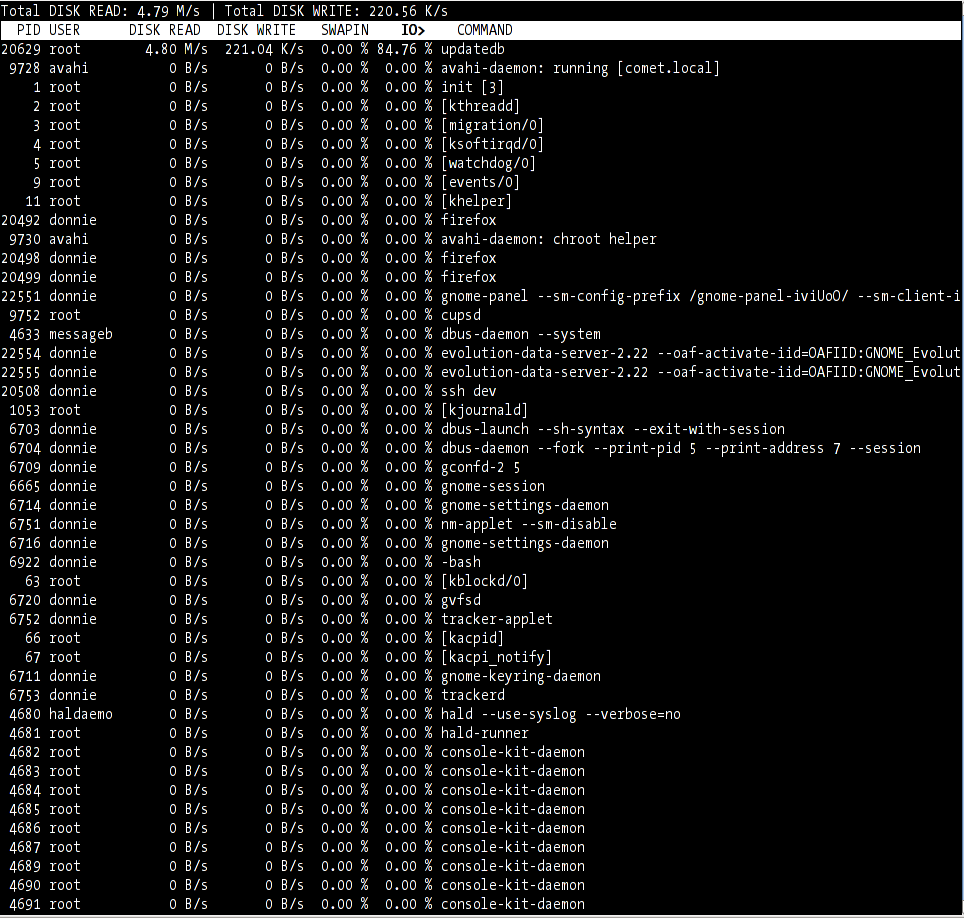
You heard it here last, to use sog‘s catchphrase. Haven’t you always wanted to track down the runaway process that was sucking up all your disk I/O? Now you can, with iotop. It’s a simple Python script, not even a full-out application. iotop uses the I/O accounting in newer 2.6 kernels >=2.6.20 (check whether /proc/self/io exists to see whether you’ve got it enabled) and requires at least Python 2.5 for AF_NETLINK sockets. Here’s what it looks like (click for larger image):

iotop screenshot

It shows overall disk read and write in MB/s. Per-process, it shows disk read and write speeds as well as percentage of time spent swapping in and percentage of time spent while waiting on I/O. In other words, it rocks.

To install it on Gentoo:
emerge iotop

You might need to sync your tree because I just added it. It’s still got testing keywords, so if you’re running stable, do this:
echo =dev-lang/python-2.5* >> /etc/portage/package.keywords
echo sys-process/iotop >> /etc/portage/package.keywords

Hot new GNOME apps in Gentoo

The inimitable Dave Neary just blogged about his favorite new GNOME apps, so I thought it’d be interesting to take a look at what it takes to get them running in Gentoo. To get a quick idea of the status, I searched our main tree and overlays using eix, then searched our Bugzilla using pybugz.

for i in gnome-do hamster tasque cheese vagalume pimlico transmission; do eix $i; bugz search $i; done

Here’s what I found (useless output removed):

* gnome-extra/gnome-do
Available versions: (~)0.4.2.0 {debug}
Homepage: http://do.davebsd.com/
Description: GNOME Do allows you to search for and perform actions on items in your desktop environment

* gnome-extra/gnome-do-plugins
Available versions: (~)0.4.0 {amarok debug evo}
Homepage: http://do.davebsd.com/
Description: Plugins to put the Do in Gnome Do

* gnome-extra/hamster-applet [1]
Available versions:  (~)0.6.1
Homepage:            http://projecthamster.wordpress.com/ http://code.google.com/p/projecthamster/
Description:         Time tracking for the masses, in a GNOME applet

[1] "sunrise" /usr/local/portage/layman/sunrise

[I] media-video/cheese
Available versions:  (~)2.22.0 (~)2.22.1 (~)2.22.2 {v4l}
Installed versions:  2.22.2(03:07:37 PM 06/18/2008)(v4l)
Homepage:            http://www.gnome.org/projects/cheese/
Description:         A cheesy program to take pictures and videos from your webcam

225775 maintainer-wanted    New ebuild: media-sound/vagalume-0.6 (Last.fm radi

* net-p2p/transmission
Available versions:  1.1.0 (~)1.11 (~)1.20 {gtk libnotify}
Homepage:            http://www.transmissionbt.com/
Description:         Simple BitTorrent client

Visiting the pimlico homepage, I found that it’s actually a suite of apps. Searching for their names revealed that we also have them. So far we’ve got gnome-do, hamster, cheese, vagalume, transmission and pimlico. Not too shabby. A quick Google search for the terms “tasque ebuild” found an ebuild for that, too! Apparently that overlay isn’t part of the eix cache, perhaps because it isn’t available through layman.

It’s worth noting that out of the 7 apps, 3 exist outside the main tree but are still trivial to find. I don’t have the time or interest in trying some of them myself. If you do try ’em, let folks know how it goes in the comments!

What can you learn from your own search and browsing history?

Google History lets you track and search your own browsing history as well as look at trends over time, on any browser with the Google Toolbar installed. (You can also do only searches without the toolbar, just signed into Google.) You can also get personalized search results based on what sites you’ve visited and what you’ve previously searched for. All of this requires that you in turn give Google access to where you’re going on the Web.

Since I signed up for the service a while ago, it’s certainly time to look at what I’m getting out of the deal. The easiest part to look at more quantitively is the trends. Here’s a calendar showing my search use over the month of May:
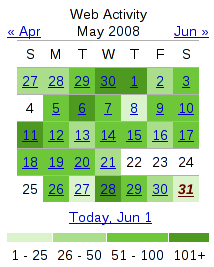
Calendar of May search history

What can we learn from this? The most obvious response is that I do a lot of searches, around 50-100 on a typical day. You can also pretty clearly see any day I’m not online, such as the vacation I took from May 22-25. I use Google a lot more than I thought–I certainly didn’t realize I was searching for things 100 times a day or more.

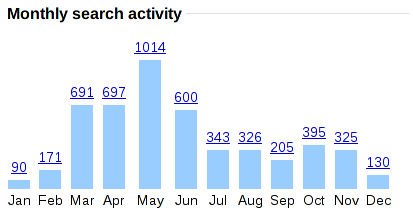
If we take a look at longer-term trends over the past year, things get pretty interesting:
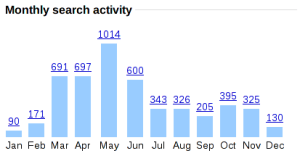
Google search trends by month

Since June is where the wrap-around is from last year to this year, you might want to envision this chart instead starting at June and going to December, then January to May. My search use was pretty steady about a year ago, then it drastically dropped over the winter, then skyrocketed over the last few months. The winter drop correlates pretty well with final exams and a big push at work to get a paper written up and a grant submitted, both of which already had much of the online research done. I’m not sure how to explain the recent surge, though. I’ve been reading a lot more tech news, so it could be me looking up details about that. The same goes for interesting new software and websites I’ve looked into. I suspect the earlier 300-400 level is the most “normal,” so perhaps I’m just wasting more time over the past 3 months.

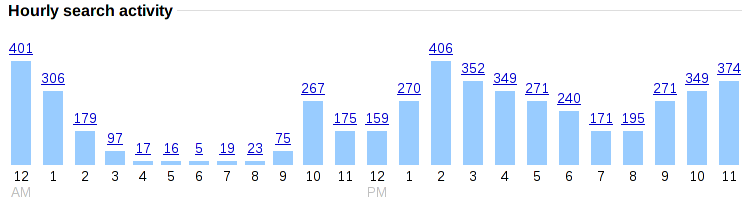
Another chart worth examining is the search activity by hour:
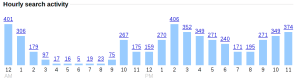
Search trends by hour

Looking at this and other data may make the monthly trends more clear too. I do the most searches shortly after getting to work, after lunch, and late at night, precisely the times I’m not getting as much work done. I would’ve guessed my most productive times at work are late morning before lunch and late afternoon, which seems to correlate well with the times with fewer searches. The nighttime increase is a whole different story, because that’s going to be work on Gentoo, which involves a lot more searching around the Web for solutions to problems.

How about searches by day of the week?
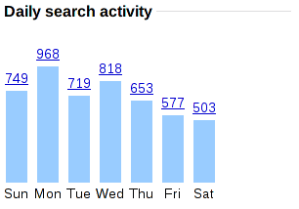
Search trends by day

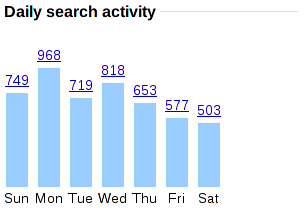
If my conclusions from the hourly searches are accurate, I probably get the most done at work when I have the lowest search results, later in the week, and I’m guessing I generally don’t get as much done on Mondays. (Case of the Mondays, anyone?) The weekend drop is interesting too. Since I spend time working on Gentoo during weekends, I’m surprised the search total isn’t higher.

That’s about it for the trends. When looking at the websites I visited most often and terms I searched for most often, I knew they were actually fairly uncommon things. That indicated to me that I rarely search for the same thing or visit the same site over and over, so I’m not just using Google as an address bar for places I go often.

The main other thing that’s been useful for me is the ability to search my browsing history. Sometimes I remember the type of site I visited, but I don’t remember the name, and being able to search my history helps me find it. Usefully, Google also lets you sort results by date in case you can remember roughly when you were there.

Have you ever looked at your search or browsing trends? How did you do it? What did you conclude?

How to run an effective meeting on IRC

Since my election to the Gentoo Council, I’ve become the de facto meeting chair and secretary. Over the past 6 months or so, I’ve learned a lot about what works well in online meetings (often by virtue of doing the opposite). By no means have I mastered this, but here’s some of my discoveries along the way.

What works well:

  • Send out a draft agenda in advance (say, 1 week). This helps avoid confusion and disorganization at the meeting, and it also allows you to have no “open floor” section at all, because all topics should have come up when you posted the draft. Settle on a final agenda a couple of days in advance.
  • On the draft, say who should attend the meeting to discuss each topic.
  • Be specific about the topic, so you stay focused during the meeting.
  • For each topic, have a very specific goal of what will be accomplished at that meeting. If it’s a decision, exactly what will the vote be? If it’s a discussion, what points do we want to get out of it, and why is it happening during the meeting instead of on mailing lists?
  • Prepare. All of the information needed to make a decision should be readily available by the time the meeting comes along. To aid this, say on the draft agenda what information will be needed.
  • Stay relentlessly on topic. Cut off diverging threads early on, before everyone gets involved.
  • During the meeting, get an action plan for each topic: What’s the next step? Who’s responsible for it? When will they have it ready? Make sure the person responsible personally commits to this–don’t just assign it to them.
  • Take notes, and post a public summary. This summary informs and reminds people of the progress made and what progress needs to be made next. By being posted publicly, it also allows for discussion, clarification and correction.
  • Keep track of unresolved topics, and keep bringing them up over and over so they can’t slip through the cracks.

What works poorly:

  • Request topics on a mailing list, but don’t collate them into an agenda until after the meeting’s started.
  • Do your best to ensure that people relevant to a topic don’t even know it’s going to be discussed, or don’t tell them what information you need from them.
  • Have vague topics, so nobody’s really sure what you’re supposed to be talking about or what you want to get out of it. Feel free to branch out into anything that seems related, or really anything at all.
  • If a topic isn’t resolved by the end of the meeting, forget about it. If it’s important, it’ll come up again, right?
  • Don’t tell anyone what the results of the meeting were. If you have to release something, make it as hard to comprehend as possible, like an IRC log instead of a summary.

It took a lot of pain and wasted time for me to figure out the value of doing things right, and I’m still working on getting some of the above points right, so I want to save you that same pain.

Do you have any more points to add? Please do so in the comments. Thanks!